Listing Group Members
You can list the members of a Fuzzball group using the CLI fuzzball group member list command.
Group members and their owner status can also be viewed through the Web UI.
Synopsis
$ fuzzball group member list [flags]
Listing Members via the Web UI
To view group members through the Web UI:
-
Log into your Fuzzball UI with appropriate permissions
-
Click on the account switcher in the top left of the dashboard (which displays your current group name)
-
In the dropdown menu, select Group Membership
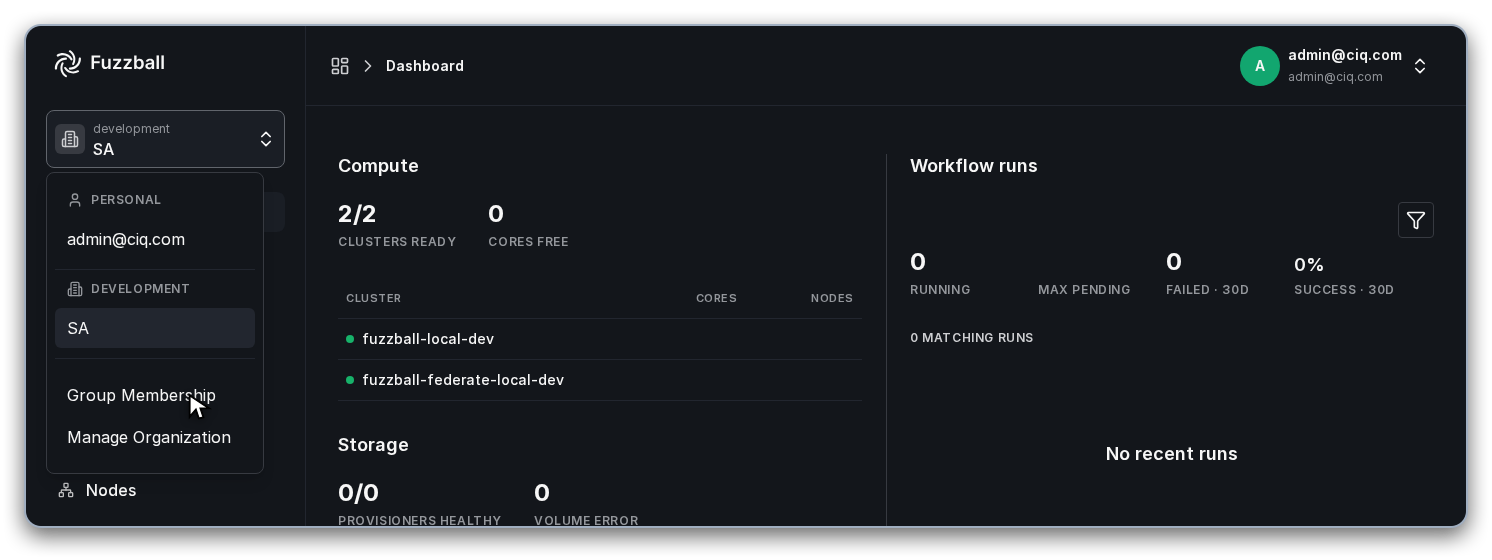
-
Select the group you want to view from the groups list
-
The Members and Owners tabs will display all users in their respective roles
You can switch between the Members and Owners tabs to view members and owners separately.
Filtering by Owner Status
By default, this returns everyone, both owners and regular members. Use --owner to list only
owners, or --owner=false to list only non-owners.
Examples
List all members (owners and non-owners) of the group research-lab:
$ fuzzball group member list --group=research-lab
List only the owners of the group:
$ fuzzball group member list --owner --group=research-lab
List only non-owner members:
$ fuzzball group member list --owner=false --group=research-lab