Provisioner Configuration Overview
The provisioner configuration file is a YAML document that defines the following:
- Global settings: Node annotations (and software license tokens coming soon)
- Provisioner definitions: Static, AWS, Slurm, PBS, and/or CoreWeave resource definitions
- Conditional and Policy expressions: Hardware based resource allocation rules and user/job-based access controls
The documentation regarding the expression language can be found at the Expr Language Definition documentation. The complete specification for the provisioner configuration is available here.
Configuration Management
Applying Configuration
After creating your provisioner configuration file you can apply it with the fuzzball cluster set-config
command like so:
$ fuzzball cluster set-config ./provision-config.yaml
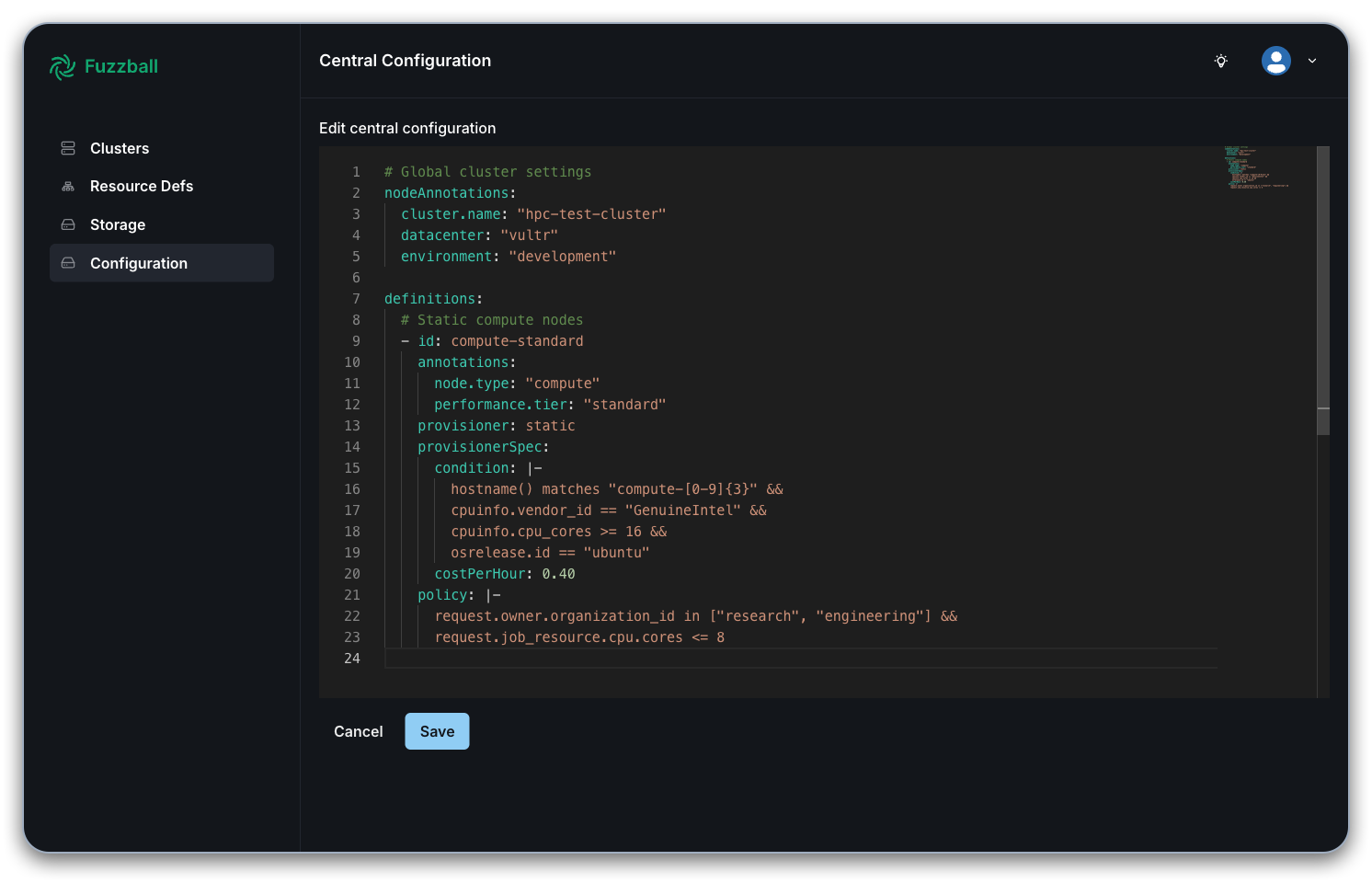
You can also add the provisioner configuration directly in the admin UI. First, navigate to the
admin UI and enter your cluster admin credentials. This is usually hosted at the same URL as the Fuzzball UI, with
the string ui being replaced by ui-admin. Then navigate to the "Configuration" tab on the left
and use the text editor to create a provisioner configuration file following the YAML format and structure described above, including global settings, provisioner definitions, and conditional policy expressions.
The substrate daemon running on compute nodes must be restarted after applying changes to the provisioner configuration.
Getting Configuration
You can get the current configuration or view configuration at a specific revision like so:
$ fuzzball cluster get-config

$ fuzzball cluster get-config --revision 5
Listing Revisions
You can list configuration revisions with the following command.
$ fuzzball cluster get-config --list-revisions
Provisioner Definitions
Provisioner definitions are used to specify the system you are using to provision your hardware, and the types of compute resources that are available to it.
When specifying available resources in your provisioner definition, you must group compute nodes by identical hardware specifications. Each definition should represent nodes with the same CPU, memory, GPU, and network hardware configuration. Nodes with different hardware capabilities require separate provisioner definitions to ensure accurate resource matching and allocation. See Hardware Grouping Requirements for more information.
Types of Provisioners
You can specify static, AWS, Slurm, PBS, or CoreWeave as your provisioning system. The static keyword configures Fuzzball to handle local provisioning itself without using a separate batch scheduler as a backend, while the other provisioners refer to cloud or batch scheduling systems.
Static Provisioner
Static provisioners define physical or pre-provisioned compute resources with condition-based matching. The static provisioner keyword allows you to additionally define specific conditions and policies that Fuzzball will use directly to provision hardware. Please see the reference section on the static provisioner for a complete specification.
AWS Provisioner
AWS provisioners support dynamic instance provisioning with instance type expansion. A catalog of
instance types is transparently provided by the AWS provisioner backend. When using wildcard
patterns (e.g., t3.*, c5.*), the system automatically expands these into individual definitions
for each matching instance type. The ${spec.instanceType} placeholder in the definition ID is
replaced with the actual instance type during expansion. Please see the reference section on the
AWS provisioner for a complete
specification.
Slurm Provisioner
Slurm provisioners integrate with existing Slurm clusters. This allows you to configure your cluster using Slurm's tools and then leverage that configuration through Fuzzball. Please see the reference section on the Slurm provisioner for a complete specification.
PBS Provisioner
PBS provisioners integrate with existing PBS clusters. This allows you to configure your cluster using the PBS tools and then leverage that configuration through Fuzzball. Please see the reference section on the PBS provisioner for a complete specification.
CoreWeave Provisioner
CoreWeave provisioners support dynamic instance provisioning on CoreWeave's cloud infrastructure,
optimized for GPU workloads. Fuzzball dynamically creates and destroys single-node NodePools
on-demand based on workflow requirements. CoreWeave provisioners support specifying instance
types and cost parameters. Please see the reference section on the CoreWeave provisioner for
a complete specification.
Static Provisioner Conditions
Static provisioner conditions use expression language to match nodes based on system attributes. Conditions are evaluated by nodes at startup or when the configuration change. This allows you match jobs to nodes that provide a specific operating system or OS version, a specific type of CPU architecture or GPU model, a specific type of network adapter, etc. Please see the reference section on the static provisioner conditions for a complete specification.
Policy Expressions
Policies control which users and jobs can access specific provisioner definitions. Policies are evaluated for each allocation request and must return a boolean result. Please see the reference section on the policy expressions for a complete specification.
Complete Configuration Examples
Multi-Provisioner Environment
The following illustrates a full example provision definition YAML file. The file defines all four provision types and is only meant for illustrative purposes. Please see the exhaustive reference documentation for more information.
# Global cluster settings
nodeAnnotations:
  cluster.name: "hpc-cluster-prod"
  datacenter: "us-east-1"
  environment: "production"

softwareTokens:
  matlab: 50
  ansys: 25
  abaqus: 15

definitions:
  # Static compute nodes
  - id: compute-standard
    annotations:
      node.type: "compute"
      performance.tier: "standard"
    provisioner: static
    provisionerSpec:
      condition: |-
        hostname() matches "compute-[0-9]{3}" &&
        cpuinfo.vendor_id == "GenuineIntel" &&
        cpuinfo.cpu_cores >= 16 &&
        osrelease.id == "ubuntu"
      costPerHour: 0.40
    policy: |-
      request.owner.organization_id in ["research", "engineering"] &&
      request.job_resource.cpu.cores <= 32

  # GPU nodes for ML workloads
  - id: gpu-ml
    annotations:
      node.type: "gpu"
      gpu.type: "nvidia"
    provisioner: static
    provisionerSpec:
      condition: |-
        hostname() matches "gpu-[0-9]{2}" &&
        modalias.match("pci:v000010DEd*sv*sd*bc03sc*i*")
      costPerHour: 3.20
    policy: |-
      request.job_resource.devices["nvidia.com/gpu"] > 0 &&
      request.owner.organization_id == "ai-ml"

  # AWS spot instances for batch processing
  - id: aws-${spec.instanceType}-spot
    provisioner: aws
    provisionerSpec:
      instanceType: c5.*
      spot: true
    policy: |-
      request.job_annotations["cost.optimization"] == "enabled" &&
      request.job_ttl >= 1800 &&
      request.job_kind == "job"

  # example Slurm cluster integration
  - id: slurm-highmem
    provisioner: slurm
    ttl: 24000
    provisionerSpec:
      costPerHour: 1.50
      cpu: 32
      memory: "256GiB"
      partition: "highmem"
    policy: |-
      request.job_resource.mem.bytes >= (128 * 1024 * 1024 * 1024)

  # example PBS cluster integration
  - id: pbs-legacy
    provisioner: pbs
    ttl: 24000
    provisionerSpec:
      cpu: 16
      memory: "64GiB"
      gpus: 0
      queue: "legacy"
    policy: |-
      request.job_annotations["workload.type"] == "legacy"

  # CoreWeave dynamic provisioning for GPU workloads
  - id: coreweave-h100
    provisioner: coreweave
    ttl: 3600
    provisionerSpec:
      instanceType: "gd-8xh100ib-i128"
      costPerHour: 15.00
    policy: |-
      request.job_resource.devices["nvidia.com/gpu"] > 0 &&
      request.job_annotations["gpu.type"] == "h100"
Development Environment
The following example illustrates one way to configure a development environment that would leverage both the static and AWS provisioners.
nodeAnnotations:
  cluster.name: "dev-cluster"
  environment: "development"

definitions:
  # Development static nodes
  - id: dev-compute
    provisioner: static
    provisionerSpec:
      condition: |-
        hostname() matches "dev-[0-9]+" &&
        cpuinfo.cpu_cores >= 4
      costPerHour: 0.10
    policy: |-
      request.owner.organization_id == "development"

  # AWS development instances
  - id: aws-dev-${spec.instanceType}
    provisioner: aws
    provisionerSpec:
      instanceType: t3.*
      spot: true
    policy: |-
      request.job_ttl <= 7200 &&
      request.job_resource.cpu.cores <= 8
Further information, Best Practices, and Potential Pitfalls
Expression Language Validation
- All expressions are validated using the Expr language.
- Static conditions are evaluated at node startup and configuration changes.
- Policies are evaluated for each allocation request.
- Invalid expressions will prevent configuration from being applied.
Performance Considerations
- Use specific hostname patterns in static conditions to avoid unnecessary evaluations.
- Combine multiple conditions using logical operators rather than creating separate definitions.
- Test complex expressions in a development environment before applying to production.
Security Best Practices
- Use restrictive policies to prevent unauthorized access to expensive resources.
- Implement organization-based access controls.
- Regularly audit policy expressions for potential bypasses.
- Consider resource limits in policies to prevent abuse.
Hardware Grouping Requirements
Provisioner definitions must group nodes by identical hardware specifications. This ensures accurate resource allocation and prevents scheduling conflicts.
Correct hardware grouping is important for the following reasons:
- Accurate Resource Reporting: Jobs receive consistent resource allocations within a hardware group.
- Cost Management: Different hardware types have different operational costs.
- Performance Predictability: Similar hardware provides consistent performance characteristics.
- Scheduling Efficiency: The scheduler can make better placement decisions with homogeneous groups.
- Resource Policies: Access controls can be tailored to specific hardware capabilities.
Correct Hardware Grouping Examples
definitions:
  # Group 1: Intel Xeon nodes with 32 cores, 128GB RAM
  - id: intel-compute-32c-128g
    provisioner: static
    provisionerSpec:
      condition: |-
        hostname() matches "compute-[01-20]" &&
        cpuinfo.vendor_id == "GenuineIntel" &&
        cpuinfo.cpu_cores == 32 &&
        cpuinfo.model_name matches "*Xeon*"
      costPerHour: 0.40

  # Group 2: Intel Xeon nodes with 64 cores, 256GB RAM
  - id: intel-compute-64c-256g
    provisioner: static
    provisionerSpec:
      condition: |-
        hostname() matches "compute-[21-40]" &&
        cpuinfo.vendor_id == "GenuineIntel" &&
        cpuinfo.cpu_cores == 64 &&
        cpuinfo.model_name matches "*Xeon*"
      costPerHour: 0.80

  # Group 3: AMD EPYC nodes with 32 cores, 128GB RAM
  - id: amd-compute-32c-128g
    provisioner: static
    provisionerSpec:
      condition: |-
        hostname() matches "amd-[01-15]" &&
        cpuinfo.vendor_id == "AuthenticAMD" &&
        cpuinfo.cpu_cores == 32 &&
        cpuinfo.model_name matches "*EPYC*"
      costPerHour: 0.35

  # Group 4: GPU nodes with NVIDIA V100s
  - id: gpu-v100-nodes
    provisioner: static
    provisionerSpec:
      condition: |-
        hostname() matches "gpu-[01-10]" &&
        modalias.match("pci:v000010DEd00001DB4sv*sd*bc03sc*i*")
      costPerHour: 3.20

  # Group 5: GPU nodes with NVIDIA A100s
  - id: gpu-a100-nodes
    provisioner: static
    provisionerSpec:
      condition: |-
        hostname() matches "gpu-[11-20]" &&
        modalias.match("pci:v000010DEd000020F1sv*sd*bc03sc*i*")
      costPerHour: 4.50
Incorrect Hardware Grouping (Avoid This)
definitions:
  # INCORRECT: Do not mix different hardware in one definition
  - id: mixed-compute-nodes
    provisioner: static
    provisionerSpec:
      condition: |-
        # This condition matches nodes with different hardware specs
        hostname() matches "compute-[0-9]+" ||
        hostname() matches "amd-[0-9]+" ||
        hostname() matches "gpu-[0-9]+"
      costPerHour: 0.50  # Single cost for different hardware types
Hardware Grouping Criteria
Group nodes based on these key characteristics.
See the reference section on Common Modalias Patterns for information about obtaining the proper modalias for a given PCI device.
# CPU Specifications
cpuinfo.vendor_id     # Intel vs AMD
cpuinfo.cpu_cores     # Core count differences
cpuinfo.model_name    # CPU generation/model

# Memory Configuration
# (Check via system commands, not available in expressions)
# - Total memory capacity
# - Memory speed/type (DDR4 vs DDR5)

# GPU Hardware
modalias.match()      # GPU vendor/model detection
# - GPU memory capacity
# - GPU architecture (V100, A100, RTX, etc.)

# Network Hardware
modalias.match()      # Network interface detection
# - Ethernet speed (1Gb, 10Gb, 25Gb)
# - InfiniBand capabilities
# - RDMA support

# Storage Configuration
# - Local SSD vs spinning disk
# - NVMe vs SATA interfaces
# - Storage capacity tiers
Recommended Grouping Strategy
# Template for hardware grouping naming convention
definitions:
  - id: {cpu_vendor}-{core_count}c-{memory_gb}g-{special_features}
    # Examples:
    # intel-32c-128g-standard
    # amd-64c-256g-highmem
    # intel-32c-128g-v100x4
    # amd-32c-128g-a100x8-infiniband